
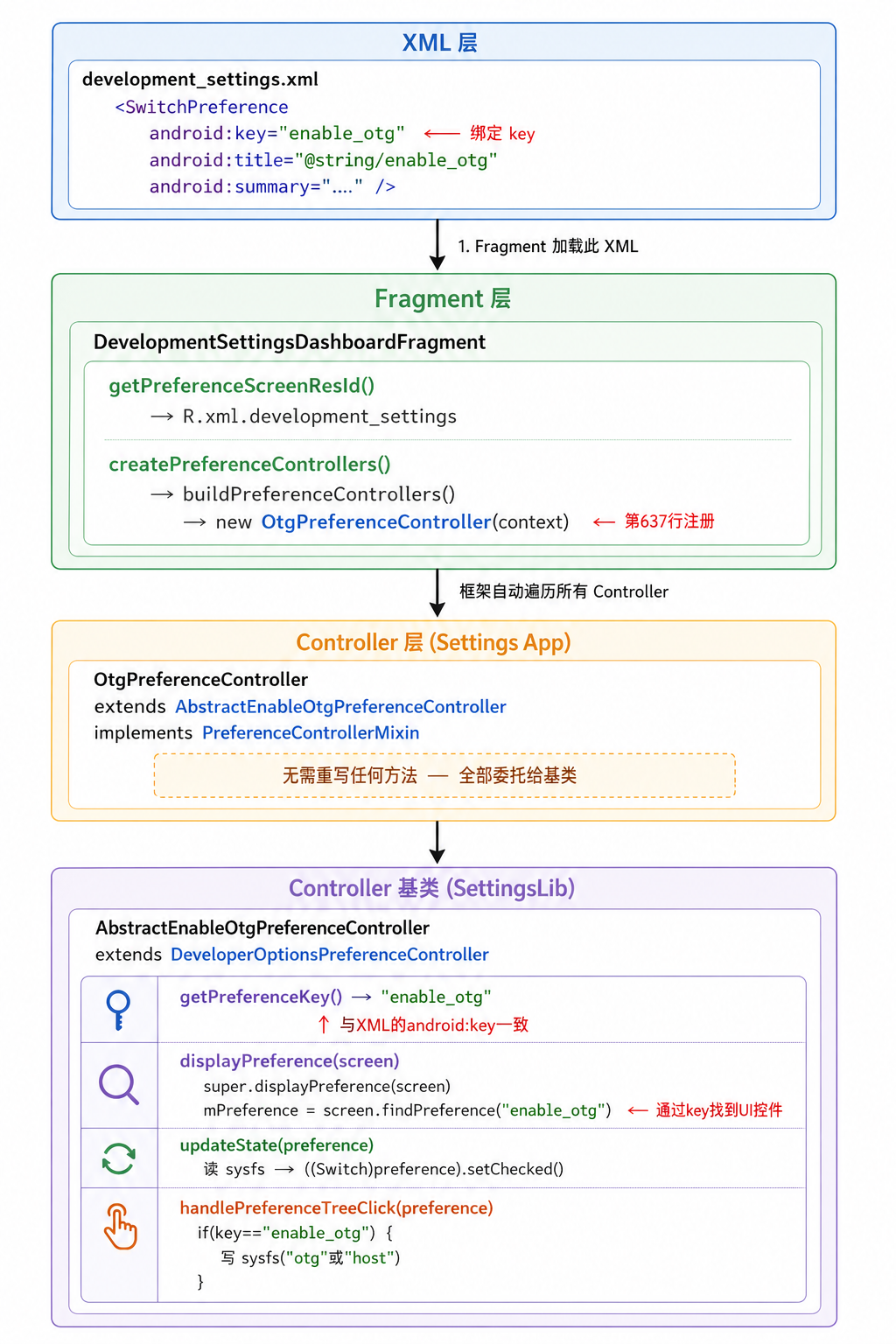
框架
框架接口在
frameworks/base/packages/SettingsLib当中Settings开发者模式代码:
packages/apps/Settings/src/com/android/settings/development/OtgPreferenceController.java
| 层级 | 职责 | 示例 |
|---|---|---|
SettingsLib (基类) |
核心业务逻辑:读写系统节点、状态管理、UI更新 | AbstractEnableAdbPreferenceController — 读写 Settings.Global.ADB_ENABLED |
| Settings App (子类) | UI层特有逻辑:弹窗、Fragment 引用等 | AdbPreferenceController — 弹出确认对话框 |
- 在
SettingsLib中创建AbstractEnableOtgPreferenceController来 作为接口管理 - 在Settings APP中创建
OtgPreferenceController起到呈上起下的作用

XML配置
- 字符配置位置(找到的去Framework去查找):
frameworks/base/packages/SettingsLib/res/values/strings.xml
<string name="enable_adb">USB debugging</string>
<!-- Setting checkbox summary for Whether to enable USB debugging support on the phone -->
<string name="enable_adb_summary">Debug mode when USB is connected</string>

<string name="enable_otg">OTG Mode</string>
<!-- Setting checkbox summary for Whether to enable otg debugging support on the phone -->
<string name="enable_otg_summary">OTG mode when OTG interface is connected</string>
UI所在位置在Settings当中 ,packages/apps/Settings/res/xml/development_settings.xml
<com.android.settingslib.RestrictedSwitchPreference
    android:key="enable_adb"
    android:title="@string/enable_adb"
    android:summary="@string/enable_adb_summary" />

<SwitchPreference
    android:key="enable_otg"
    android:title="@string/enable_otg"
    android:summary="@string/enable_otg_summary" />
Fragment加载
packages/apps/Settings/src/com/android/settings/development/DevelopmentSettingsDashboardFragment.java
- 在
初始化过程中 框架会 自动遍历所有Controller
controllers.add(new OtgPreferenceController(context));
- 在
Settings中extend AbstractEnableAdbPreferenceController OtgPreferenceController extend AbstractEnableOtgPreferenceController类 来调用SettingsLib方法
package com.android.settings.development;
import android.content.Context;
import com.android.settings.core.PreferenceControllerMixin;
import com.android.settingslib.development.AbstractEnableOtgPreferenceController;
/**
 * Preference controller for the OTG mode switch in Developer Options.
 *
 * <p>Extends {@link AbstractEnableOtgPreferenceController} from SettingsLib which handles
 * all core logic: reading/writing the sysfs node at
 * {@code /sys/devices/platform/2602e000.syscon/2602e000.syscon:usb2-phy@0/otg_mode},
 * UI state updates, and developer-options-switch reset behavior.
 *
 * <p>No confirmation dialog is shown — toggling takes effect immediately.
 */
public class OtgPreferenceController extends AbstractEnableOtgPreferenceController implements
        PreferenceControllerMixin {

    public OtgPreferenceController(Context context) {
        super(context);
    }
}
- xml 如何 和 Java 通过 Key 实现 绑定
public abstract class AbstractEnableOtgPreferenceController extends
        DeveloperOptionsPreferenceController {

    private static final String TAG = "EnableOtgPrefCtrl";
    private static final String KEY_ENABLE_OTG = "enable_otg";

    /** Sysfs node path for OTG mode control on RK3576 platform. */
    private static final String OTG_MODE_SYSFS_PATH =
            "/sys/devices/platform/2602e000.syscon/2602e000.syscon:usb2-phy@0/otg_mode";
    private static final String OTG_PORT = "persist.sys.otg.mode";

    /** Value written to sysfs to enable OTG mode. */
    private static final String OTG_MODE_VALUE_ON = "otg";
    /** Value written to sysfs to disable OTG (i.e., switch to HOST mode). */
    private static final String OTG_MODE_VALUE_OFF = "host";

    public AbstractEnableOtgPreferenceController(Context context) {
        super(context);
    }
	// 告诉框架,此类事哪个XML元素的Controller,返回值与xml中定义的key完全一致。
    @Override
    public String getPreferenceKey() {
        return KEY_ENABLE_OTG;
    }

    @Override
    public void displayPreference(PreferenceScreen screen) {
        super.displayPreference(screen);
        if (isAvailable()) {
            mPreference = (TwoStatePreference) screen.findPreference(KEY_ENABLE_OTG);
        }
    }
	// true是否可见
    @Override
    public boolean isAvailable() {
        return true;
    }

    @Override
    public void updateState(Preference preference) {
        boolean otgEnabled = isOtgEnabled();
        ((TwoStatePreference) preference).setChecked(otgEnabled);
    }

    @Override
    public boolean handlePreferenceTreeClick(Preference preference) {
        if (!KEY_ENABLE_OTG.equals(preference.getKey())) {
            return false;
        }
        boolean isChecked = ((TwoStatePreference) preference).isChecked();
        writeOtgSetting(isChecked);
        return true;
    }
    /**
     * Write OTG mode to the sysfs node.
     *
     * @param enable true for OTG mode, false for HOST mode.
     */
    protected void writeOtgSetting(boolean enable) {
        String value = enable ? OTG_MODE_VALUE_ON : OTG_MODE_VALUE_OFF;
        SystemProperties.set(OTG_PORT, value);
        writeSysfsNode(OTG_MODE_SYSFS_PATH, value);
        Log.d(TAG, "writeOtgSetting: enable=" + enable + ", wrote '" + value + "'");
    }

    /**
     * Read current OTG mode from the sysfs node.
     *
     * @return true if currently in OTG mode, false if in HOST mode.
     */
    protected boolean isOtgEnabled() {
        // String currentValue = readSysfsNode(OTG_MODE_SYSFS_PATH);
        String currentValue = SystemProperties.get(OTG_PORT,OTG_MODE_VALUE_ON);
        boolean enabled = OTG_MODE_VALUE_ON.equalsIgnoreCase(currentValue);
        Log.d(TAG, "isOtgEnabled: value='" + currentValue + "', enabled=" + enabled);
        return enabled;
    }

    /**
     * Called when Developer Options master switch is turned OFF.
     * Resets OTG back to HOST mode.
     */
    @Override
    protected void onDeveloperOptionsSwitchDisabled() {
        super.onDeveloperOptionsSwitchDisabled();
        writeOtgSetting(false);
        if (mPreference != null) {
            ((TwoStatePreference) mPreference).setChecked(false);
        }
    }

    // ==================== Sysfs I/O Utilities ====================

    /**
     * Write a string value to a sysfs node.
     *
     * @param path  absolute path of the sysfs file.
     * @param value the string value to write.
     */
    private static void writeSysfsNode(String path, String value) {
        FileOutputStream fos = null;
        try {
            fos = new FileOutputStream(path);
            fos.write(value.getBytes());
            fos.flush();
        } catch (IOException e) {
            Log.e(TAG, "Failed to write '" + value + "' to " + path, e);
        } finally {
            if (fos != null) {
                try {
                    fos.close();
                } catch (IOException e) {
                    Log.e(TAG, "Error closing " + path, e);
                }
            }
        }
    }

    /**
     * Read a string value from a sysfs node.
     *
     * @param path absolute path of the sysfs file.
     * @return the trimmed content of the file, or empty string on error.
     */
    private static String readSysfsNode(String path) {
        BufferedReader reader = null;
        try {
            reader = new BufferedReader(new FileReader(path));
            String line = reader.readLine();
            return (line != null) ? line.trim() : "";
        } catch (IOException e) {
            Log.e(TAG, "Failed to read from " + path, e);
            return "";
        } finally {
            if (reader != null) {
                try {
                    reader.close();
                } catch (IOException e) {
                    Log.e(TAG, "Error closing reader for " + path, e);
                }
            }
        }
    }
}
文章摘自:https://www.cnblogs.com/foryouos/p/19993703
 京ICP备14020293号-4